
Wix alternatives for solo business owners
Wix alternatives scored on one axis: can a non-technical owner actually run this alone in month six? Honest verdicts, including when to pick Wix.
Every roundup of Wix alternatives scores the same things: templates, price, app store, ecommerce. Those lists are not wrong, they are just answering a question you do not have.
If you are running a business by yourself, the question is narrower and much harder:
Six months from now, when you need to add a service page, change your pricing, or send a note to everyone who filled in your contact form — will you actually be able to do it yourself?
That is the axis I am scoring on here. Not beauty, not feature counts. Operability by one non-technical person, indefinitely.
We have some standing to judge this. James Cook Media built 300+ client websites and funnels before building StoryPages, which means we also answered the support emails six months after launch. The pattern was relentless and it had almost nothing to do with which builder we had used.
Why “beautiful” is the wrong scoring criterion
Let me get this out of the way, because two tools on this list are genuinely better looking than what most people will produce anywhere else.
Design quality is real, and it matters at first impression. But design is a launch-day property. Operability is a permanent one. A slightly plainer site that you update every month will out-earn a gorgeous site frozen in the state it was in the week your designer finished it — because the frozen one still lists a service you stopped offering and a price you raised.
Almost every dead website we have been asked to rescue was attractive. It was just abandoned, because the owner was afraid of breaking it.
Wix: the incumbent, and where it stops working
Wix’s strength is breadth. There is a feature for nearly everything, the app market covers the long tail, and the free-form editor means you can put anything anywhere.
That last part is also the failure mode. Absolute positioning means every edit is a design decision, and design decisions compound — you nudge a heading on desktop, and the mobile layout quietly develops a problem you find three weeks later. Solo owners respond rationally: they stop editing.
Wix is genuinely right for you if you enjoy visual tinkering, if you update the site often enough to stay fluent in the editor, or if you need one of its niche apps and nothing else has it.
It breaks down when the site is a thing you own rather than a thing you enjoy. That is most solo owners. See our fuller Wix comparison for the detail.
Squarespace: the best-looking answer, with a ceiling
I will say plainly what most comparison articles will not: Squarespace makes better-looking sites than we do out of the box, and it does it for people with no design training. The template system is opinionated in the way good design systems are opinionated — it constrains you into taste. Nothing on this list beats it for a clean brochure site built by a non-designer.
Where it stops serving a solo owner is everything behind the site. Forms collect submissions, but the customer record is thin. Email is a bolt-on rather than a system. Once you need to segment your list, tag a lead by where it came from, or run a sequence, you are adding tools — and now you own the seams between them.
Right for you if the site is essentially a beautiful business card and your customer relationships live somewhere else entirely (or in your head, honestly, which is fine at some sizes).
Breaks down when marketing becomes a process rather than a page. More in our Squarespace comparison.
Framer: superb, and not for you unless you design
Framer is the best pure web design tool in this category. If you can design, the ceiling is extremely high — real layout control, real interaction design, output that looks like a funded startup’s site.
The honest caveat is that Framer assumes design fluency the way a DAW assumes you can hear when something is out of tune. Handed to a non-designer, it does not produce a worse site than Wix; it produces an unfinished one, because it does not decide anything for you.
Right for you if you are a designer, or you have one, and the site is a craft object you will keep working on.
Breaks down for a solo non-designer, for the same reason a professional kitchen breaks down for someone who wanted dinner.
Durable: the fastest path to one page
Durable is built around a single promise: describe the business, get a site, stop thinking about it. For a plumber, a mobile groomer, a solo cleaner — a business where the website’s whole job is “we exist, we are local, here is the number” — that promise is often exactly right.
Right for you if one page is genuinely enough and the phone is your funnel.
Breaks down when you grow past one page. The tool’s simplicity is not a starting point you build on; it is the whole shape. Owners who outgrow it tend to migrate rather than expand.
GoHighLevel: powerful, and it will not be you driving it
GoHighLevel has more marketing capability than anything else on this list — CRM, pipelines, automations, phone and SMS. Its entry plan is $97/month.
But GHL is a platform you administer. Sub-accounts, snapshots, triggers, workflows, custom values. We resold it for years to hundreds of clients, and I can tell you what almost every one of those accounts had in common: an agency, a VA, or a contractor logging in. Not the owner.
Right for you if you are an agency, or if you employ someone whose job includes “operate the marketing platform”, or if outbound calling and SMS are core to how you sell.
Breaks down for exactly the reader this article is for. The full argument is in our GoHighLevel comparison.
WordPress: the deepest ecosystem, and an ongoing job
WordPress runs a large share of the web for good reasons. Nothing else has its plugin depth, its portability, or its escape hatches. If you have a genuinely unusual requirement, WordPress probably has an answer.
It also has an owner problem. Core updates, plugin updates, plugin conflicts, security patching, backups, a caching layer, and eventually a performance problem someone has to diagnose. Managed hosting absorbs some of that. It does not absorb the judgement calls.
Right for you if someone technical is attached — you, a developer, or a host you trust and pay accordingly.
Breaks down the moment nobody is attached. Unmaintained WordPress is the single most common broken website we are asked to fix.
StoryPages: what we built, and what it costs you in tradeoffs
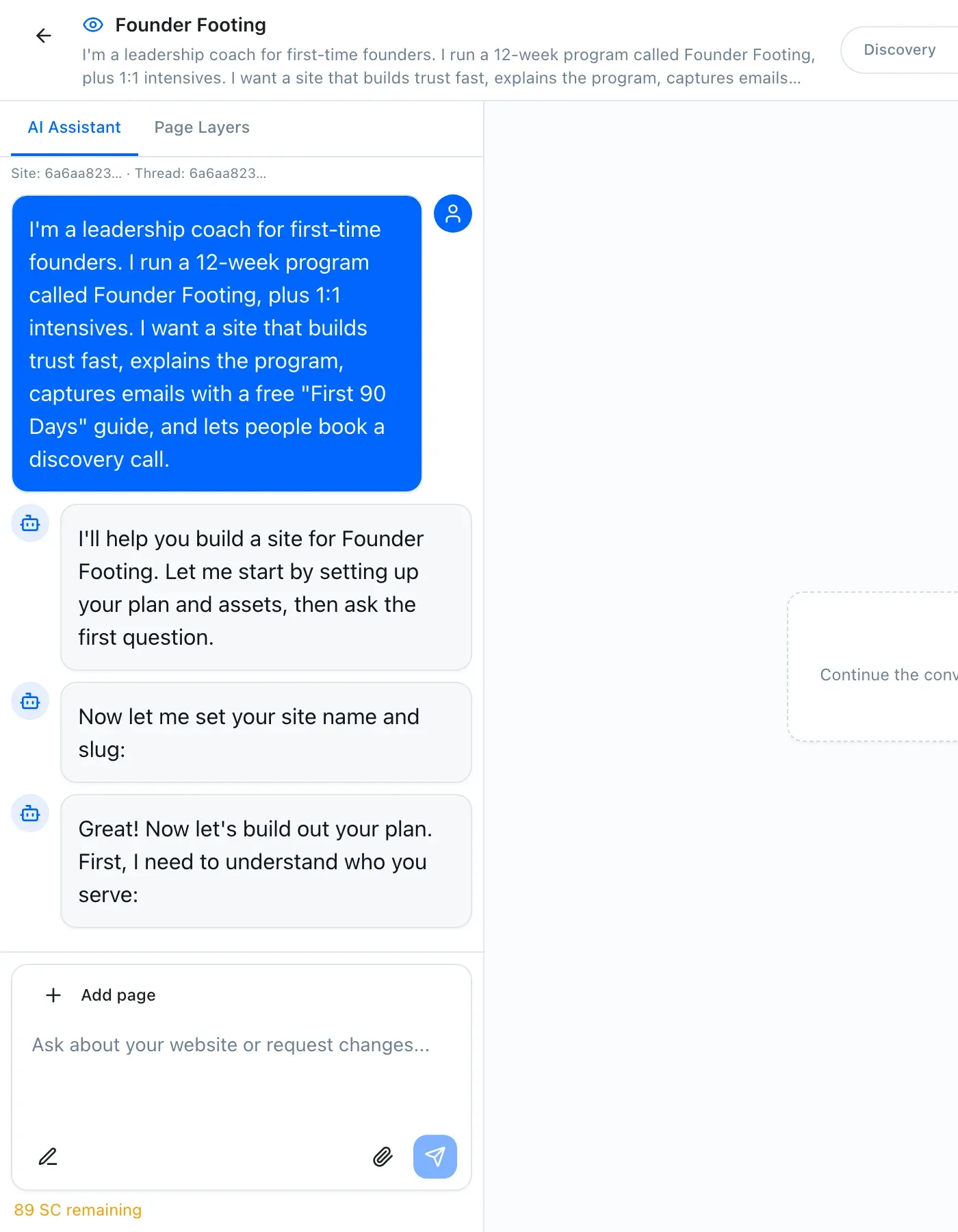
Our answer to the month-six problem is to make editing the site the same action as building it: a conversation. You describe the business, approve a style direction, approve a sitemap, approve wireframes, and it goes live.
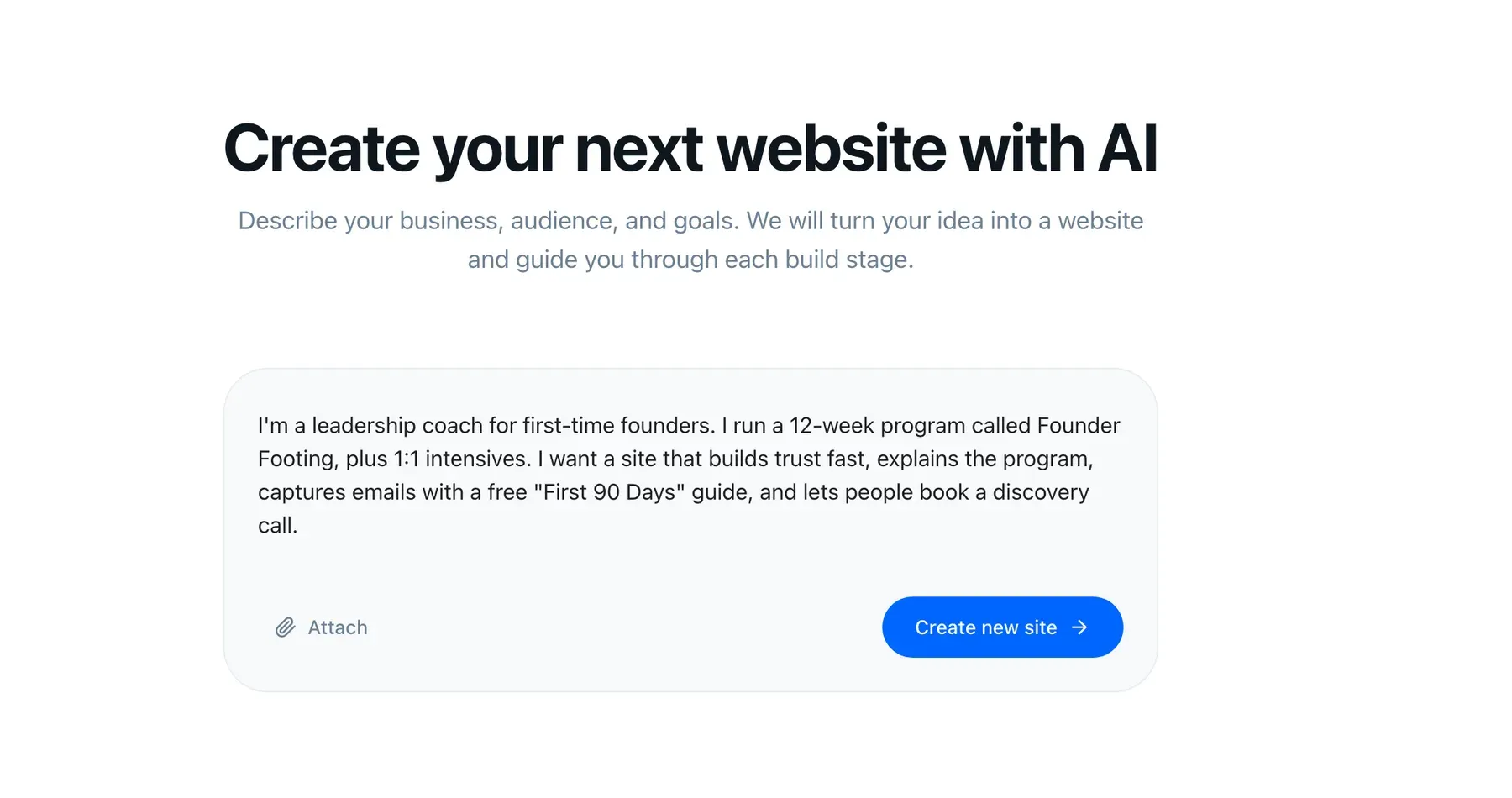
The assistant stays in the rail afterwards. Changing your pricing page in month six is a sentence, not a re-learning exercise.
Underneath, the CRM and
email marketing are part of the same product, so a
form submission becomes a contact becomes a segment without glue. And every site
ships AI visibility by default — structured data,
llms.txt, semantic HTML, static pages — because your buyers increasingly ask
an assistant before they ask Google.
The tradeoffs, stated plainly: you get less pixel-level control than Framer or Wix, our template library is younger than Squarespace’s, and our integration surface is smaller than WordPress’s. If control is your constraint, we are the wrong pick, and I would rather say so here than after you sign up.
The comparison, with the nuance left in
| Capability | StoryPages | Wix |
|---|---|---|
| First site live same day Wix is genuinely fast to launch. So is Durable. | ✓ | ✓ |
| Editing in month six without relearning Free-form editors reward frequent use and punish absence. | ✓ | Depends |
| Design quality without design skill Squarespace is still the leader here; we are not claiming otherwise. | ✓ | ✓ |
| Pixel-level layout control A real Wix strength. Framer is stronger still. | — | ✓ |
| CRM in the same product Wix has CRM-ish features; the contact record is thinner than a real CRM. | ✓ | — |
| Email marketing in the same product | ✓ | Partly |
| AI visibility shipped by default llms.txt, schema, semantic HTML, static delivery. | ✓ | — |
| MCP server for Claude and ChatGPT | ✓ | — |
| App marketplace breadth Wix and WordPress both beat us badly here. | — | ✓ |
| Works with no technical owner attached Both fine. WordPress is the one that fails this test. | ✓ | ✓ |
| Entry price | $29/mo | Low tens of dollars |
Read the table honestly and you will notice we lose four rows. That is the correct number for a young product, and the rows we lose are mostly about control and breadth rather than about whether you can run the thing.
The decision guide
Answer the first question that applies.
- Do you design, or employ a designer? Pick Framer. Nothing else gives a designer that much room.
- Is one page genuinely enough, forever? Pick Durable. Do not buy a platform for a page.
- Is the site a beautiful business card, with customers managed elsewhere? Pick Squarespace. It is the best-looking non-designer output on this list.
- Do you have a developer, or an unusual technical requirement? Pick WordPress. Budget the maintenance honestly.
- Are you an agency, or does outbound phone and SMS drive your revenue? Pick GoHighLevel. We resold it; it earns its price for that buyer.
- Do you enjoy the Wix editor and update your site monthly? Stay on Wix. Migration has a real cost and you are not experiencing the problem.
- Is none of the above true — you are the owner, the operator, and the person who will log in, and the site needs to feed a list you actually email? That is who we built StoryPages for.
Six of those seven answers are not our product. That is not modesty, it is the shape of the market: most website advice fails because it recommends one tool to everyone.
What we would tell a friend
Pick the tool whose worst day you can survive alone.
Every product here has a good launch day. The differences show up on the ordinary Tuesday when you need to change something, have twenty minutes, and nobody to ask. Score for that Tuesday and the list gets much shorter.
If you want the side-by-sides in more depth, they are all on our comparisons page, and there is more on how we think about this in the rest of the blog.